
What's Nearby Category

Last updated: June 16, 2026 | 5 minutes read

This example demonstrates how to search for points of interest (POIs) of a specific category around the device's current position. As soon as a location fix is available the app searches for nearby gas stations and lists them, each with its icon, name, address and distance from the reference point. The example runs without a map view - it uses only the SearchService.
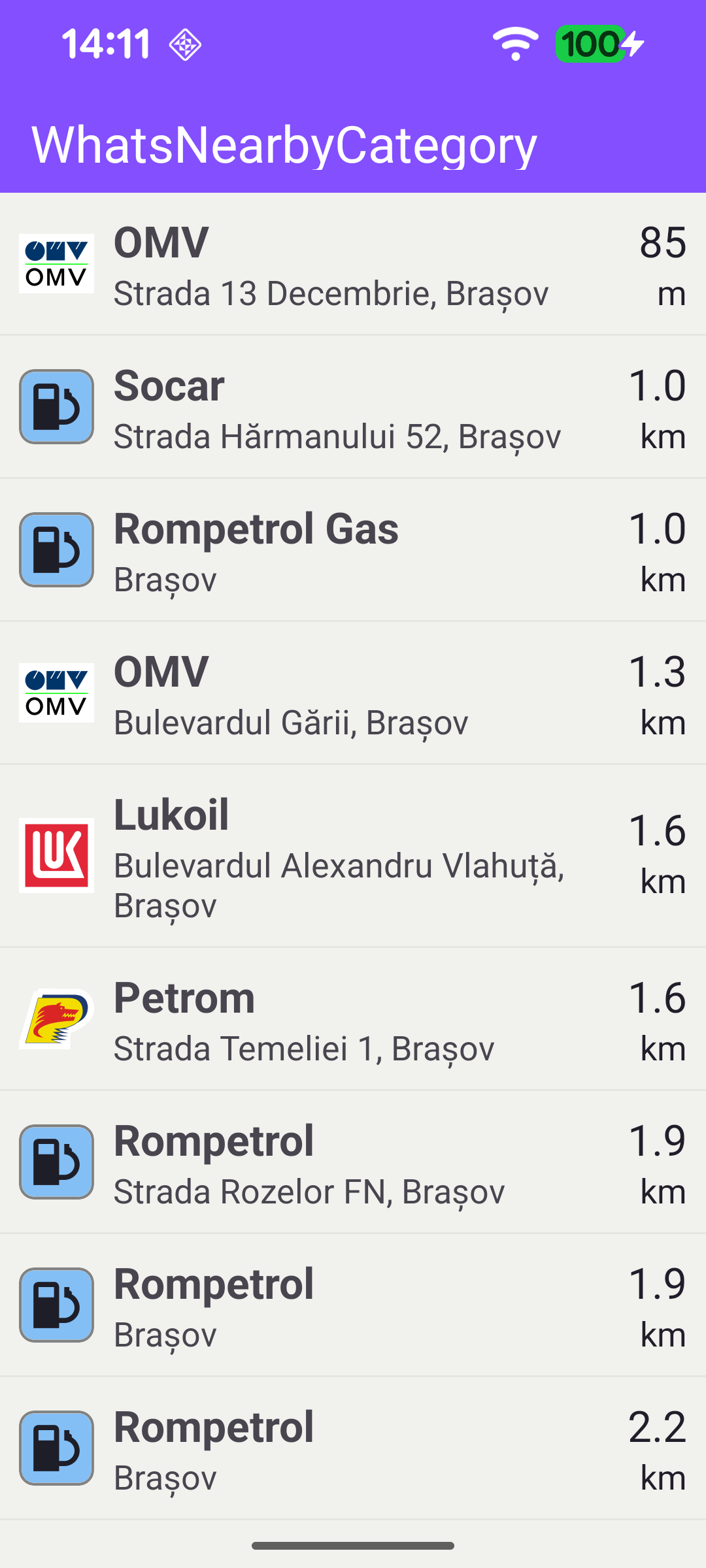
Gas stations near the current location

Search Service

A single SearchService drives the example. Its onStarted callback shows the progress bar, and onCompleted handles the outcome: on success the non-empty results are bound to a CustomAdapter for display; an empty result set shows a "no results" dialog; and any error (other than a cancellation) is reported.

MainActivity.ktView on Github
private val searchService = SearchService(
onStarted = {
binding.progressBar.visibility = View.VISIBLE
},

onCompleted = { results, errorCode, _ ->
binding.progressBar.visibility = View.GONE

when (errorCode) {
GemError.NoError -> {
if (results.isNotEmpty()) {
reference?.let {
binding.listView.adapter = CustomAdapter(it, results, imageSize)
}
} else {
runOnAliveUi { showDialog(message = getString(R.string.no_results)) }
}
}
else -> {
if (errorCode != GemError.Cancel) {
runOnAliveUi {
showDialog(message = getString(R.string.search_error, SdkCall.runSynced { GemError.getMessage(errorCode, this) }))
}
}
}
}
},
)

Initializing Without a Map

onCreate sets up the list view and initializes the SDK. Because this example has no map view, GemSdk.initSdkWithDefaults(this) is the mandatory initialization step. It then checks that location services are enabled and requests location permission (required for the search to return relevant nearby results), verifies internet connectivity, and registers the SDK listeners.

MainActivity.ktView on Github
override fun onCreate(savedInstanceState: Bundle?) {
enableEdgeToEdge()
super.onCreate(savedInstanceState)
binding = ActivityMainBinding.inflate(layoutInflater)
setContentView(binding.root)

// Keep status-bar icons light against the dark primary toolbar background.
WindowCompat.getInsetsController(window, window.decorView).isAppearanceLightStatusBars = false

imageSize = resources.getDimension(R.dimen.landmark_image_size).toInt()
binding.listView.apply {
layoutManager = LinearLayoutManager(this@MainActivity)
addItemDecoration(
DividerItemDecoration(applicationContext, (layoutManager as LinearLayoutManager).orientation),
)
setBackgroundResource(R.color.background)
}

// Mandatory SDK init step when using the SDK without a map view.
val initResult = GemSdk.initSdkWithDefaults(this)
if (initResult != GemError.NoError) {
showDialog(
message = getString(R.string.sdk_initialization_failed, SdkCall.runSynced { GemError.getMessage(initResult, this) }),
onDismiss = { finish() },
)
return
}

// Location permission is required for the search to return relevant nearby results.
if (checkLocationStatus()) {
requestPermissions()
}

if (!Util.isInternetConnected(this)) {
runOnAliveUi { showDialog(message = getString(R.string.internet_required)) }
}

registerSdkListeners()
}

Waiting for the Map Data and a Position Fix

The search needs both the worldwide road map and a valid position. A self-clearing onWorldwideRoadMapSupportStatus listener fires once the map data is up to date. If a GPS fix is already available it searches immediately; otherwise it registers a one-shot PositionListener that triggers the search as soon as the first valid position arrives. In both cases the position is stored as the reference used to compute distances.

MainActivity.ktView on Github
private fun registerSdkListeners() {
// Self-clearing listener: fires once when the SDK map data is ready, then removes itself.
SdkSettings.onWorldwideRoadMapSupportStatus = { status ->
if (status == EOffboardListenerStatus.UpToDate) {
SdkSettings.onWorldwideRoadMapSupportStatus = {}

SdkCall.execute {
val currentPosition = PositionService.getCurrentPosition()
if (currentPosition?.valid() == true) {
// GPS fix is already available - search immediately.
reference = currentPosition
search()
} else {
// No fix yet; wait for the first valid position update.
positionListener = PositionListener {
if (!it.isValid()) return@PositionListener
PositionService.removeListener(positionListener)
reference = it.coordinates
search()
}
PositionService.addListener(positionListener, EDataType.Position)
}
}
}
}

SdkSettings.onApiTokenRejected = { showInvalidTokenDialog() }
}

Searching by Category

The actual search is a single call: searchAroundPosition is given the category to look for (EGenericCategoriesIDs.GasStation) and the reference position.

MainActivity.ktView on Github
private fun search() {
searchService.searchAroundPosition(EGenericCategoriesIDs.GasStation, reference)
}
note

This example is hard-wired to gas stations, but you can search for any other category by passing a different EGenericCategoriesIDs value. Calling searchAroundPosition without a category instead returns the closest POIs of any type around the reference position.

Displaying the Results

When the search completes, CustomAdapter binds each Landmark to a list row. For every result it computes the distance from the reference point with coordinates?.getDistance(reference), formats it with getDistText, and fills in the landmark's icon, name and address description.

MainActivity.ktView on Github
class CustomAdapter(
private val reference: Coordinates,
private val dataSet: ArrayList<Landmark>,
private val imageSize: Int,
) : RecyclerView.Adapter<CustomAdapter.ViewHolder>() {

class ViewHolder(val binding: ListItemBinding) : RecyclerView.ViewHolder(binding.root)

override fun onCreateViewHolder(viewGroup: ViewGroup, viewType: Int): ViewHolder {
val binding = ListItemBinding.inflate(LayoutInflater.from(viewGroup.context), viewGroup, false)
return ViewHolder(binding)
}

override fun onBindViewHolder(viewHolder: ViewHolder, position: Int) {
SdkCall.execute {
val landmark = dataSet[position]
val meters = landmark.coordinates?.getDistance(reference)?.toInt() ?: 0
val dist = getDistText(meters, EUnitSystem.Metric, true)

viewHolder.binding.run {
image.setImageBitmap(landmark.imageAsBitmap(imageSize))
listItemText.text = landmark.name
listItemDescription.text = GemUtil.getLandmarkDescription(landmark, true)
statusText.text = dist.first
statusDescription.text = dist.second
}
}
}

override fun getItemCount() = dataSet.size
}