
Search Along Route

Last updated: June 12, 2026 | 5 minutes read

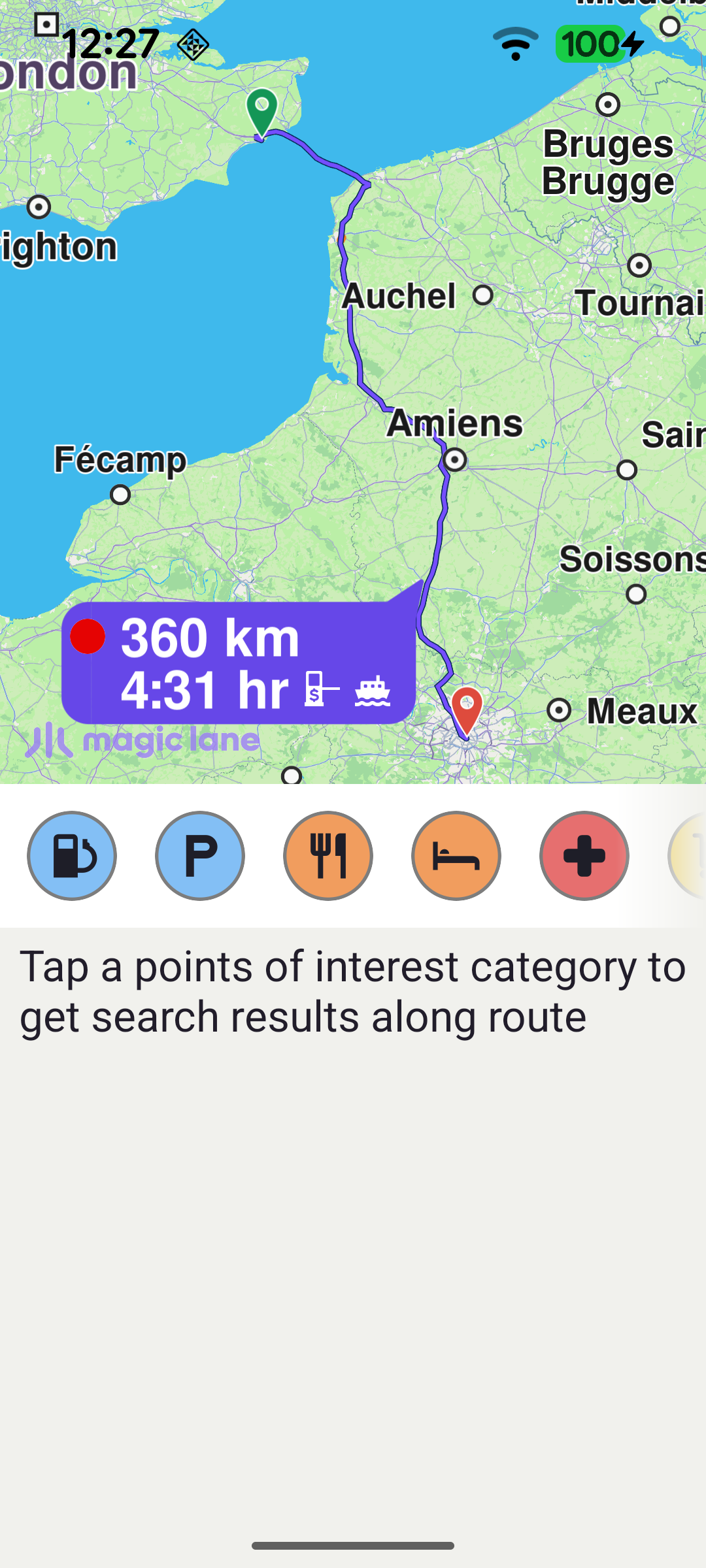
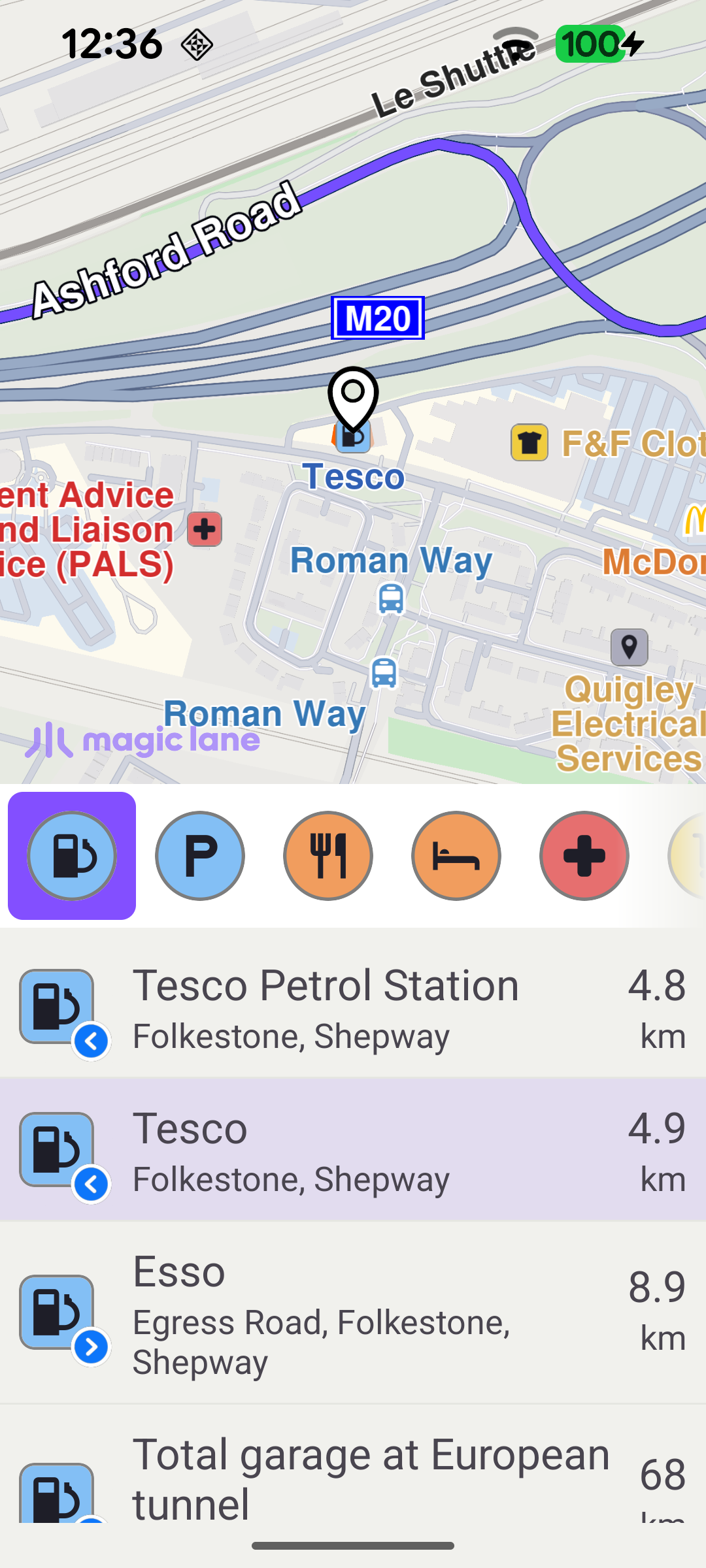
This example demonstrates how to search for points of interest (POIs) along a pre-calculated route. When the app starts it computes a route, then slides in a search panel showing a bar of POI categories. Tapping a category searches for that type of place along the route, and each result lists its name, description, distance and the side of the route it is on. Tapping a result highlights it on the map.

Tap a POI category to search along the route
Tap a result to highlight it on the map

Calculating the Route

Once the worldwide road map is ready, the demo sets up the map touch handler, loads the POI categories and calculates the route. The route runs between two fixed waypoints (Folkestone → Paris) and is computed with RoutingService.calculateRoute.

MainActivity.ktView on Github
private fun calculateRoute() = SdkCall.execute {
val waypoints = arrayListOf(
Landmark("Folkestone", 51.0814, 1.1695),
Landmark("Paris", 48.8566932, 2.3514616),
)
routingService.calculateRoute(waypoints)
}

When the routing service completes, the first route is kept as mainRoute and the search panel is shown. showSearchPanel() resizes the map to share the screen with the panel and then calls presentRoute on the next layout pass, so the route is framed using the map's final (half-screen) dimensions.

MainActivity.ktView on Github
private val routingService = RoutingService(
onStarted = {
binding.progressBar.visibility = View.VISIBLE
},

onCompleted = { routes, errorCode, _ ->
when (errorCode) {
GemError.NoError -> {
if (routes.isNotEmpty()) {
mainRoute = routes[0]
binding.progressBar.visibility = View.GONE
// showSearchPanel resizes the map area and then presents the route
// via View.post so that presentRoute sees the final view dimensions.
showSearchPanel()
}
}
else -> {
if (errorCode != GemError.Cancel) {
runOnAliveUi {
binding.progressBar.visibility = View.GONE
showDialog(getString(R.string.routing_service_error, SdkCall.runSynced { GemError.getMessage(errorCode, this) }))
}
}
}
}
},
)

Loading POI Categories

The category chips in the search panel are built from the SDK's generic POI categories. Each CategoryItem keeps the category name, icon and id; the list is then submitted to the horizontal categoriesView adapter.

MainActivity.ktView on Github
private fun loadCategories() {
val items = SdkCall.execute {
GenericCategories().categories?.map { cat ->
val iconSize = resources.getDimensionPixelSize(R.dimen.category_icon_size)
CategoryItem(
name = cat.name.orEmpty(),
icon = cat.image?.asBitmap(iconSize, iconSize),
id = cat.id,
)
} ?: emptyList()
} ?: emptyList()
Util.postOnMain {
if (isActivityAlive()) {
categoryAdapter.submitItems(items)
}
}
}

Searching Along the Route

Tapping a category chip calls searchAlongRouteForCategory. The selected category id is mapped to an EGenericCategoriesIDs value, any in-flight search is cancelled, the maximum number of matches is capped, and the search is launched with SearchService.searchAlongRoute(mainRoute, category). Tapping the already-selected chip again deselects it and clears the result list.

MainActivity.ktView on Github
private fun searchAlongRouteForCategory(category: CategoryItem) {
binding.searchHint.isVisible = false
SdkCall.execute {
val enumVal = EGenericCategoriesIDs.entries.firstOrNull { it.value == category.id } ?: return@execute
searchService.cancelSearch()
searchService.preferences.maxMatches = 25
searchService.searchAlongRoute(mainRoute, enumVal)
}
}

The SearchService reports progress through its onStarted / onCompleted callbacks. On completion the returned landmarks are mapped to displayable ResultItems and submitted to the list; a "no results" message is shown when the search returns nothing.

MainActivity.ktView on Github
private val searchService = SearchService(
onStarted = {
binding.searchProgressBar.visibility = View.VISIBLE
},

onCompleted = onCompleted@{ results, errorCode, _ ->
if (errorCode != GemError.Cancel) {
binding.searchProgressBar.visibility = View.INVISIBLE

val items = SdkCall.execute {
buildResultItems(results)
} ?: listOf()
resultAdapter.submitList(items)

binding.noResultText.isVisible = items.isEmpty()

if (errorCode != GemError.NoError) {
GEMLog.error(this, getString(R.string.search_error, SdkCall.runSynced { GemError.getMessage(errorCode, this) }))
}
}
},
)

Building the Result Items

Each result carries extra information produced by the along-route search. buildResultItems reads gm_search_result_dist to obtain the distance along the route and gm_search_result_side to decide whether the POI is on the left or right of the route, choosing the matching side icon.

MainActivity.ktView on Github
private fun buildResultItems(landmarks: ArrayList<Landmark>): List<ResultItem> {
val imageSize = resources.getDimensionPixelSize(R.dimen.list_item_image_size)
val sideIconSize = resources.getDimensionPixelSize(R.dimen.side_icon_size)
return landmarks.map { lm ->
val distRaw = lm.findExtraInfo("gm_search_result_dist = ")?.trim().orEmpty()
val dist = GemUtil.getDistText(distRaw.toIntOrNull() ?: 0, SdkSettings.unitSystem)
val side = lm.findExtraInfo("gm_search_result_side = ")?.trim().orEmpty()
val sideIconId = when {
side.equals("Left side", ignoreCase = true) -> SdkImages.Engine_Misc.Poi_ToLeft.value
side.equals("Right side", ignoreCase = true) -> SdkImages.Engine_Misc.Poi_ToRight.value
else -> -1
}
ResultItem(
image = lm.imageAsBitmap(imageSize),
name = lm.name.orEmpty(),
description = GemUtil.getLandmarkDescription(lm, true),
distanceText = dist.first,
distanceUnit = dist.second,
sideImage = if (sideIconId >= 0) GemUtilImages.asBitmap(sideIconId, sideIconSize, sideIconSize) else null,
landmark = lm,
)
}
}

Highlighting a Result on the Map

When the user taps a result row, highlightLandmarkOnMap clears any previous highlight, assigns the SDK's built-in search-result pin as the landmark image, and brings the landmark into view. POIs that have a geographic contour (parks, buildings, etc.) are centred on that area with centerOnRectArea and their contour is drawn; point POIs are centred on their coordinate with centerOnCoordinates. The landmark is then highlighted with activateHighlightLandmarks.
MainActivity.ktView on Github
private fun highlightLandmarkOnMap(landmark: Landmark) = SdkCall.execute {
binding.gemSurfaceView.mapView?.let { mapView ->
val rect = getRouteViewRect()
mapView.deactivateAllHighlights()
// Assign the SDK's built-in search-result pin as the landmark's display image.
landmark.image = ImageDatabase().getImageById(SdkImages.Core.Search_Results_Pin.value)
val contour = landmark.getContourGeographicArea()
if (contour != null && !contour.isEmpty()) {
mapView.centerOnRectArea(
contour,
zoomLevel = 75,
viewRc = rect,
animation = Animation(EAnimation.Linear, ROUTE_ANIMATION_DURATION_MS),
)
mapView.activateHighlightLandmarks(
landmark,
HighlightRenderSettings(
EHighlightOptions.ShowContour.value or EHighlightOptions.ShowLandmark.value or EHighlightOptions.Overlap.value,
).apply { imageSize = HIGHLIGHT_IMAGE_SIZE },
)
} else {
landmark.coordinates?.let {
mapView.centerOnCoordinates(
it,
75,
rect.center,
Animation(EAnimation.Linear, ROUTE_ANIMATION_DURATION_MS),
0.0,
0.0,
)
}
mapView.activateHighlightLandmarks(
landmark,
HighlightRenderSettings(
EHighlightOptions.ShowLandmark.value or EHighlightOptions.Overlap.value,
).apply { imageSize = HIGHLIGHT_IMAGE_SIZE },
)
}
}
}