
Fly To Route Instruction

Last updated: June 19, 2026 | 4 minutes read

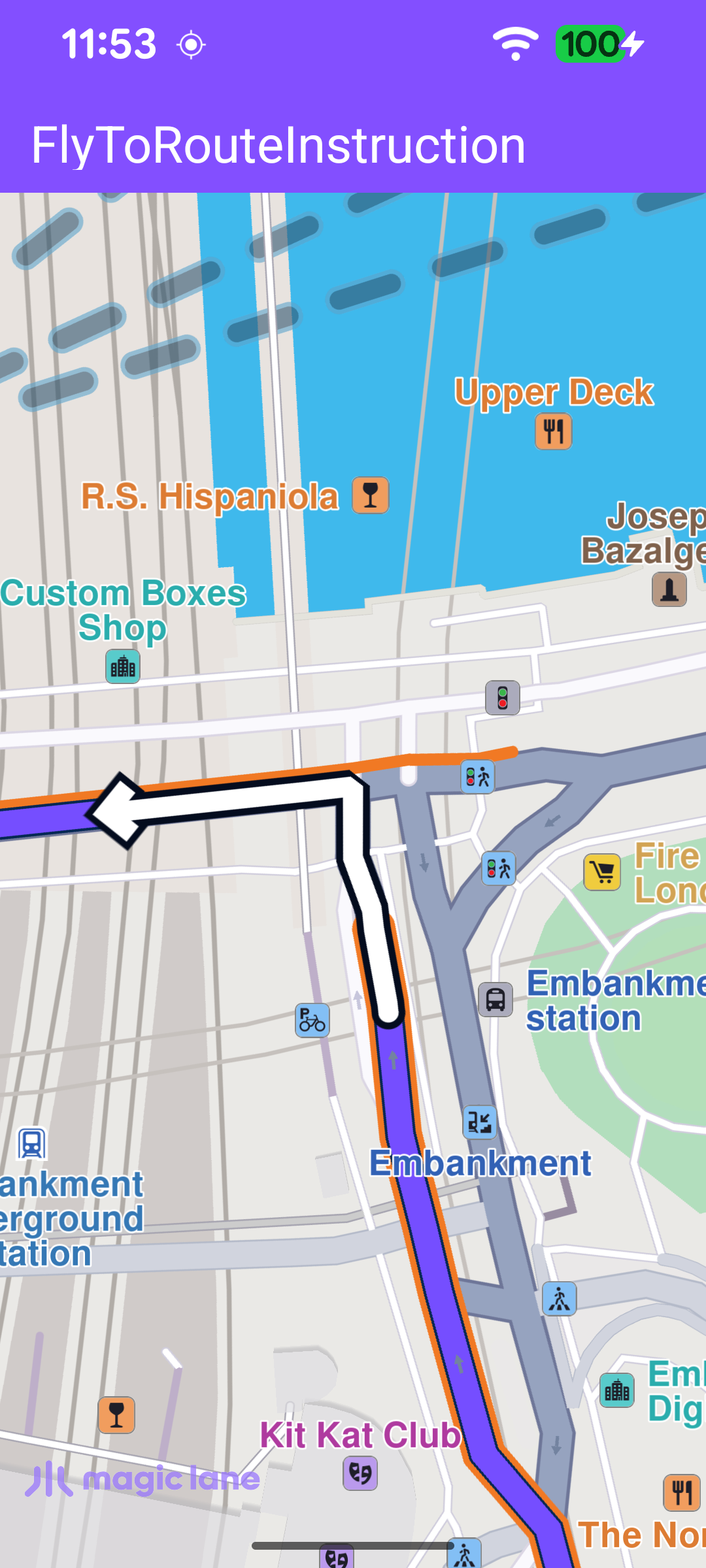
This example demonstrates how to calculate a route and fly the camera to one of its instructions. A route is computed between two waypoints (London and Paris), presented on the map, and the camera is then animated to centre on a single route instruction (a turn or manoeuvre along the way). The map remains fully interactive, supporting pan, pinch-zoom, rotate and tilt.

The route presented on the map with the camera centered on one instruction

Calculating the Route

Once the worldwide road map is confirmed up to date, the callback is cleared so it fires only once, then a route is calculated between two Landmark waypoints with calculateRoute.

calculateRoute returns an error code synchronously, indicating whether the calculation could be started. A non-NoError value means it never started, so the onCompleted callback won't fire - the error is therefore reported here with an error dialog.

MainActivity.ktView on Github
SdkSettings.onWorldwideRoadMapSupportStatus = { status ->
if (status == EOffboardListenerStatus.UpToDate) {
// Clear the listener immediately to avoid repeated route calculations.
SdkSettings.onWorldwideRoadMapSupportStatus = {}

SdkCall.runSynced {
val waypoints = arrayListOf(
Landmark("London", 51.5073204, -0.1276475),
Landmark("Paris", 48.8566932, 2.3514616),
)

// calculateRoute returns synchronously whether the calculation could be
// started. On failure onCompleted never fires, so report the error here.
val errorCode = routingService.calculateRoute(waypoints)
if (errorCode != GemError.NoError) {
val errorMessage = GemError.getMessage(errorCode, this)
runOnAliveUi { showDialog(getString(R.string.routing_failed_to_start, errorMessage)) }
}
}
}
}

Picking an Instruction and Flying to It

When routing completes, the first route is taken, presented on the map without auto-centering, and an instruction is selected from its instructions list - the one at index 5, or the last one if the route has fewer instructions. That instruction is then passed to flyToInstruction.

MainActivity.ktView on Github
private val routingService = RoutingService(
onStarted = {
binding.progressBar.visibility = View.VISIBLE
},

onCompleted = onCompleted@{ routes, gemError, _ ->
binding.progressBar.visibility = View.GONE

when (gemError) {
GemError.NoError -> {
if (routes.isEmpty()) return@onCompleted

// Get the main route from the ones that were found.
val route = routes[0]

SdkCall.runSynced {
val instructions = route.instructions
if (instructions.isEmpty()) {
runOnAliveUi { showDialog(getString(R.string.no_route_instruction_found)) }
return@runSynced
}

// Pick instruction at index 5, or the last one if fewer exist.
val instruction = instructions[5.coerceAtMost(instructions.size - 1)]

// Present the route on the map without auto-centering.
binding.gemSurfaceView.mapView?.presentRoute(route, centerMapView = false)

flyToInstruction(instruction)
}
}
else -> {
val errorMessage = SdkCall.runSynced { GemError.getMessage(gemError, this) }
runOnAliveUi { showDialog(getString(R.string.routing_error, errorMessage)) }
}
}
},
)

Centering on the Instruction

flyToInstruction animates the camera to the chosen instruction with centerOnRouteInstruction. The instruction is centred on the middle of the free-space rectangle so it is not hidden behind the toolbar or the system bars.
MainActivity.ktView on Github
// Centers the camera on the given route instruction with a smooth animation.
private fun flyToInstruction(instruction: RouteInstruction) = SdkCall.runSynced {
binding.gemSurfaceView.mapView?.centerOnRouteInstruction(
instruction,
82,
getFreeSpaceRect().center,
Animation(EAnimation.Linear, 900),
0.0,
)
}

getFreeSpaceRect() builds the rectangle the camera is centred within, from the toolbar position, the window insets and the system bars.

MainActivity.ktView on Github
// Returns the usable screen area excluding system bars and the toolbar.
private fun getFreeSpaceRect(): Rect {
val root = binding.root
val insets = ViewCompat.getRootWindowInsets(root)?.getInsets(SYSTEM_INSET_TYPES)

val width = root.width.takeIf { it > 0 } ?: resources.displayMetrics.widthPixels
val height = root.height.takeIf { it > 0 } ?: resources.displayMetrics.heightPixels

val left = insets?.left ?: 0
val right = (width - (insets?.right ?: 0)).coerceAtLeast(left)

val topInset = insets?.top ?: 0
val toolbarBottom = binding.toolbar.bottom.takeIf { it > 0 } ?: 0
val top = maxOf(topInset, toolbarBottom)
val bottom = (height - (insets?.bottom ?: 0)).coerceAtLeast(top)

return Rect(left, top, right, bottom)
}