
Social Event Voting

Last updated: June 18, 2026 | 7 minutes read

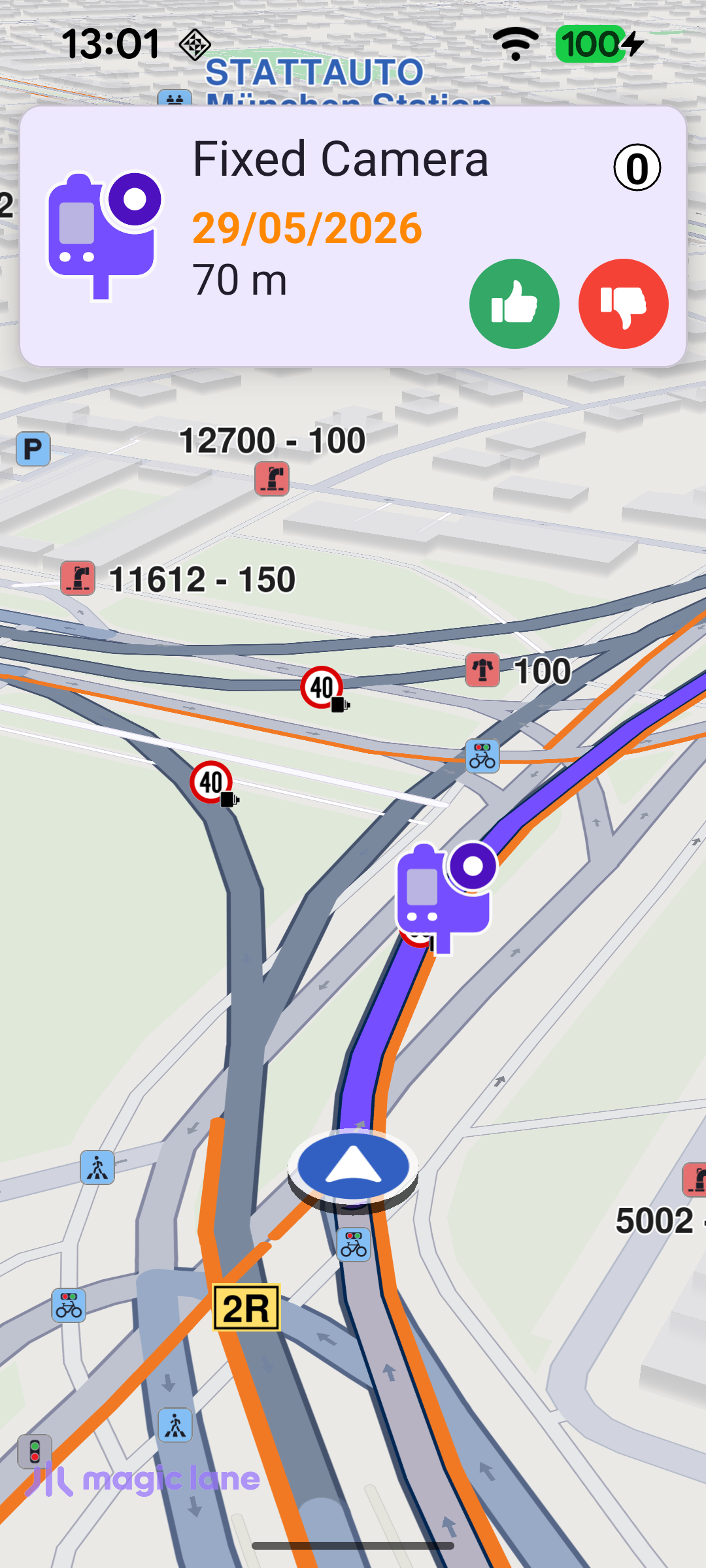
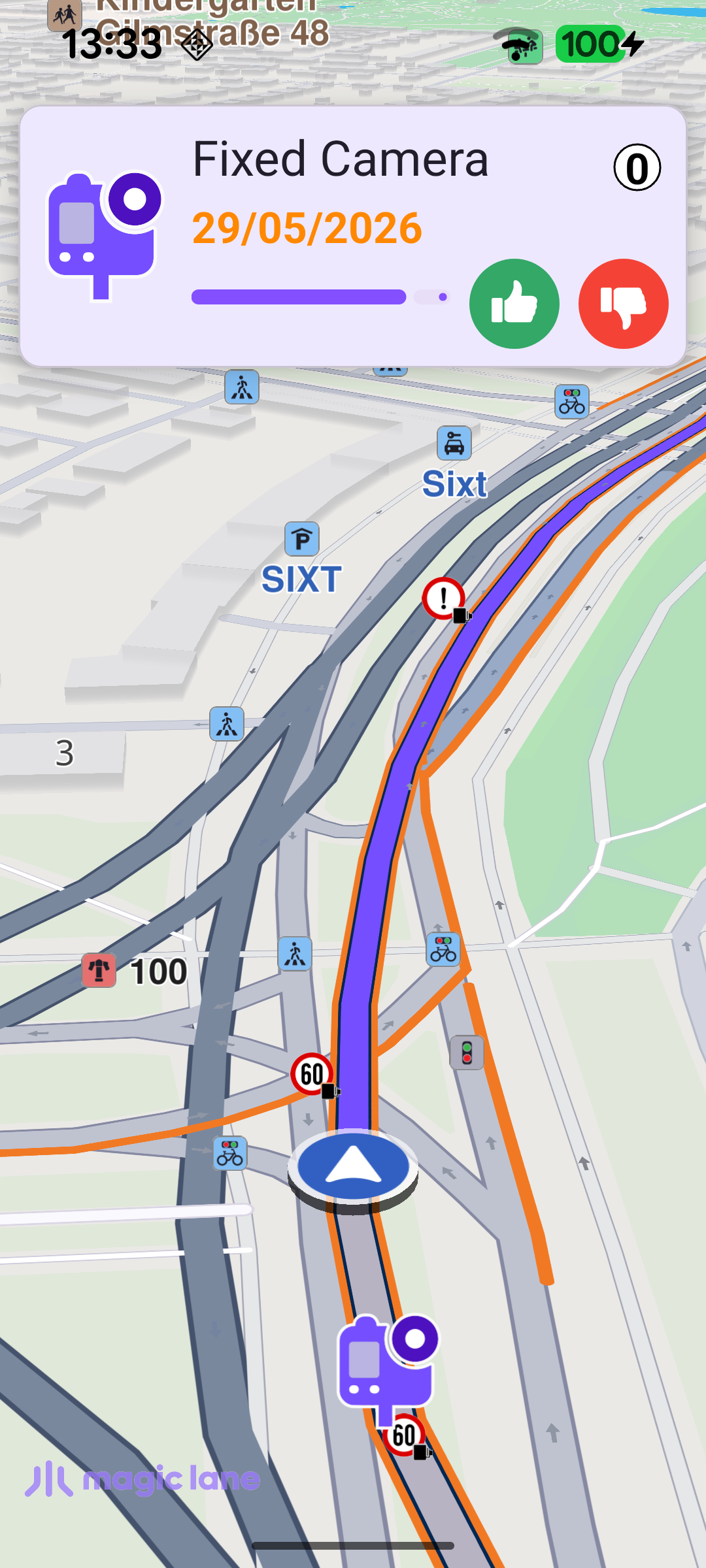
This example demonstrates how to let the user vote on social events (community-reported road events) during navigation. It simulates driving along a route and uses an alarm service to detect social reports ahead. As the vehicle approaches a reported event, a voting panel appears showing the event details and the remaining distance, the event is highlighted on the map, and a spoken warning is played. Once the event is passed, the panel stays for a few more seconds so the user can confirm whether the report was accurate.

Social event reporting (before)
Social event reporting (after)

Map Setup

MainActivity overrides onCreate, which inflates the view binding, lays the voting panel out for the current orientation, registers the SDK listeners, and checks for an internet connection.

registerSdkListeners() applies a custom map style once the map view is created, and - importantly - waits for onWorldwideRoadMapSupportStatus to report UpToDate before starting the simulation, so simulation only begins once the road map data is fully available. The callback self-clears after firing once.

MainActivity.ktView on Github
private fun registerSdkListeners() {
binding.gemSurfaceView.onSdkInitFailed = { error ->
val errorMessage = getString(R.string.sdk_initialization_failed, GemError.getMessage(error, this))
runOnAliveUi { showDialog(errorMessage) { finish() } }
}

binding.gemSurfaceView.onDefaultMapViewCreated = { mapView ->
applyCustomAssetStyle(mapView)
updateFocusViewport()
}

binding.gemSurfaceView.onSurfaceChanged = { _, _ ->
updateFocusViewport()
}

// Delay simulation start until the worldwide road map is fully downloaded and up to date.
SdkSettings.onWorldwideRoadMapSupportStatus = { status ->
if (status == EOffboardListenerStatus.UpToDate) {
SdkSettings.onWorldwideRoadMapSupportStatus = {}
startSimulation()
}
}

SdkSettings.onApiTokenRejected = {
runOnAliveUi { showDialog(getString(R.string.token_rejected_message)) }
}
}

Starting the Simulation

startSimulation() drives a simulated route between two waypoints using navigationService.startSimulation, passing the navigationListener that reacts to navigation events. It checks the error code returned by startSimulation and shows an error dialog if the simulation could not be started.

MainActivity.ktView on Github
private fun startSimulation() = SdkCall.execute {
val waypoints = arrayListOf(
Landmark("", 48.11005536802689, 11.520246863603928),
Landmark("", 48.11376725816093, 11.517058814987786),
)

val error = navigationService.startSimulation(waypoints, navigationListener, ProgressListener())
if (error != GemError.NoError) {
runOnUiThread {
showDialog(getString(R.string.route_simulation_error, SdkCall.runSynced { GemError.getMessage(error, this) }))
}
}
}

When navigation starts, the navigationListener configures the social-reports alarm overlay, presents the route, and begins following the simulated position.

Watching for Social Events

setAlarmOverlay() creates an AlarmService with the alarmListener, sets the distance at which alarms fire (ALARM_DISTANCE_METERS = 500 m), and registers only the Social Reports overlay so the service triggers as the route approaches a reported event.

MainActivity.ktView on Github
private fun setAlarmOverlay(overlay: ECommonOverlayId) {
SdkCall.execute {
alarmService = AlarmService.produce(alarmListener)
alarmService?.alarmDistance = ALARM_DISTANCE_METERS
OverlayService().getAvailableOverlays(null)?.first?.let { list ->
alarmService?.overlays?.add(ArrayList(list.filter { it.uid == overlay.value }))
}
}
}

Reacting to Alarms

The alarmListener is the heart of the example:

  • onOverlayItemAlarmsUpdated fires as the position moves relative to a nearby event. The first time a given event is seen, it plays a spoken warning and opens the voting panel; on subsequent updates it just refreshes the distance shown in the panel. The current event is tracked in socialAlarmOverlayItem to tell a new alarm apart from an update to the same one.
  • onOverlayItemAlarmsPassedOver fires once the event has been driven past. If voting is allowed for that event, it starts the "passed" countdown (keeping the panel open); otherwise it hides the panel.
MainActivity.ktView on Github
private val alarmListener = AlarmListener.create(
onOverlayItemAlarmsUpdated = {
SdkCall.execute execute@{
val alarmsList = alarmService?.overlayItemAlarms ?: return@execute
if (alarmsList.size == 0) return@execute

val alarm = alarmsList.getItem(0) ?: return@execute
val distance = alarmsList.getDistance(0)

if (socialAlarmOverlayItem?.overlayUid != alarm.overlayUid) {
// First time this alarm is encountered - play TTS and open the voting panel.
socialAlarmOverlayItem = alarm
val categoryTts = alarm.getPreviewData()
?.find { it.key == ESocialOverlayParamsKeys.ReportCategNameTTS.value }
?.valueString ?: ""
playAlarmWarning(getString(R.string.tts_caution_alarm, categoryTts))
Util.postOnMain { showVotingPanel(alarm, distance) }
} else {
Util.postOnMain { updateAlarmDistance(distance) }
}
}
},
onOverlayItemAlarmsPassedOver = {
// Capture and clear before the SDK call to avoid a race with onOverlayItemAlarmsUpdated.
val item = socialAlarmOverlayItem
socialAlarmOverlayItem = null
SdkCall.execute {
val votingEnabled = item?.getPreviewData()
?.find { it.key == "allow_thumb" }
?.valueBoolean == true
Util.postOnMain { if (votingEnabled) startPassedCountdown() else hideVotingPanel() }
}
},
)

Showing the Voting Panel

showVotingPanel() populates the panel from the event's preview data - its icon, name, creation time and current score - and shows the distance to the event. If the event allows voting (allow_thumb), the thumb-up and thumb-down buttons are shown. Tapping thumb-up confirms the report with SocialOverlay.confirmReport(overlay, ProgressListener()); thumb-down simply dismisses the panel (denying a report is intentionally skipped during simulation). The event is also highlighted on the map via highlightAlarmOnMap.

MainActivity.ktView on Github
private fun showVotingPanel(overlay: OverlayItem, alarmDistance: Float? = null) {
countdownTimer?.cancel()
countdownTimer = null
binding.countdownProgress.visibility = View.GONE
binding.eventVotingContainer.visibility = View.VISIBLE

highlightAlarmOnMap(overlay)

var bitmap: Bitmap? = null
var nameText = ""
var timeText = ""
var scoreText = ""
var showVoteButtons = false
val eventImageSize = resources.getDimension(R.dimen.event_image_size).toInt()

SdkCall.execute {
val previewData = overlay.getPreviewData()
bitmap = overlay.image?.asBitmap(eventImageSize, eventImageSize)
nameText = overlay.name.toString()
scoreText = previewData?.find { it.key == ESocialOverlayParamsKeys.ReportScore.value }?.valueString.toString()
timeText = formatEventTimestamp(
previewData?.find { it.key == ESocialOverlayParamsKeys.ReportCreateTimeUTC.value }?.valueLong ?: 0
)
showVoteButtons = previewData?.find { it.key == "allow_thumb" }?.valueBoolean == true
}

binding.apply {
icon.setImageBitmap(bitmap)
text.text = nameText
time.text = timeText
score.text = scoreText
}

if (alarmDistance != null) updateAlarmDistance(alarmDistance) else binding.distance.visibility = View.GONE

val buttonVisibility = if (showVoteButtons) View.VISIBLE else View.GONE
binding.thumbUpButton.visibility = buttonVisibility
binding.thumbDownButton.visibility = buttonVisibility

if (showVoteButtons) {
binding.thumbUpButton.setOnClickListener {
val errorCode = SdkCall.execute { SocialOverlay.confirmReport(overlay, ProgressListener()) } ?: -1
if (errorCode < 0) {
showDialog(getString(R.string.confirm_report_failed, SdkCall.runSynced { GemError.getMessage(errorCode, this) }))
}
hideVotingPanel()
}
binding.thumbDownButton.setOnClickListener {
// Deny voting is intentionally skipped in simulation.
hideVotingPanel()
}
}
}

Voting After Passing the Event

This is the key behavior of the example. When the event is passed, the voting panel is not dismissed right away. Instead, startPassedCountdown() keeps it on screen for 10 seconds, showing a shrinking progress indicator in place of the distance. This gives the user a moment to vote after they have actually driven past the location and can judge whether the reported event was really there. If they do not vote within the 10 seconds, the panel hides automatically.

MainActivity.ktView on Github
private fun startPassedCountdown() {
binding.distance.visibility = View.INVISIBLE
binding.countdownProgress.progress = 100
binding.countdownProgress.visibility = View.VISIBLE

countdownTimer?.cancel()
countdownTimer = object : CountDownTimer(10_000L, 50L) {
override fun onTick(millisUntilFinished: Long) {
binding.countdownProgress.progress = (millisUntilFinished / 10_000f * 100).toInt()
}
override fun onFinish() {
hideVotingPanel()
}
}.start()
}

Highlighting the Event on the Map

So the user can spot the event the panel refers to, highlightAlarmOnMap() highlights it using the overlay item's own icon, enlarged, with mapView.activateHighlightLandmarks. Re-activating with the same id replaces any previous highlight, and removeAlarmHighlight() clears it when the panel is hidden.
MainActivity.ktView on Github
private fun highlightAlarmOnMap(overlay: OverlayItem) = SdkCall.execute {
val mapView = binding.gemSurfaceView.mapView ?: return@execute
val image = overlay.image ?: return@execute
val coordinates = overlay.coordinates ?: return@execute

val landmark = Landmark().apply {
this.image = image
this.coordinates = coordinates
}
val landmarkList = LandmarkList().apply { add(landmark) }

val highlightSettings = HighlightRenderSettings(
EHighlightOptions.ShowLandmark.value or EHighlightOptions.Overlap.value,
).also {
// Enlarge the alarm icon so the highlighted event stands out on the map.
it.imageSize = 10.0
}

// Re-activating with the same id replaces any previously highlighted alarm.
mapView.activateHighlightLandmarks(landmarkList, highlightSettings, ALARM_HIGHLIGHT_ID)
}