
Overlapped Maps

Last updated: June 16, 2026 | 5 minutes read

This example demonstrates how to layer map views: a full-screen default map with a smaller, independent second map view overlapped on top of it. Each view has its own camera, so the two maps can be panned, zoomed and rotated independently.
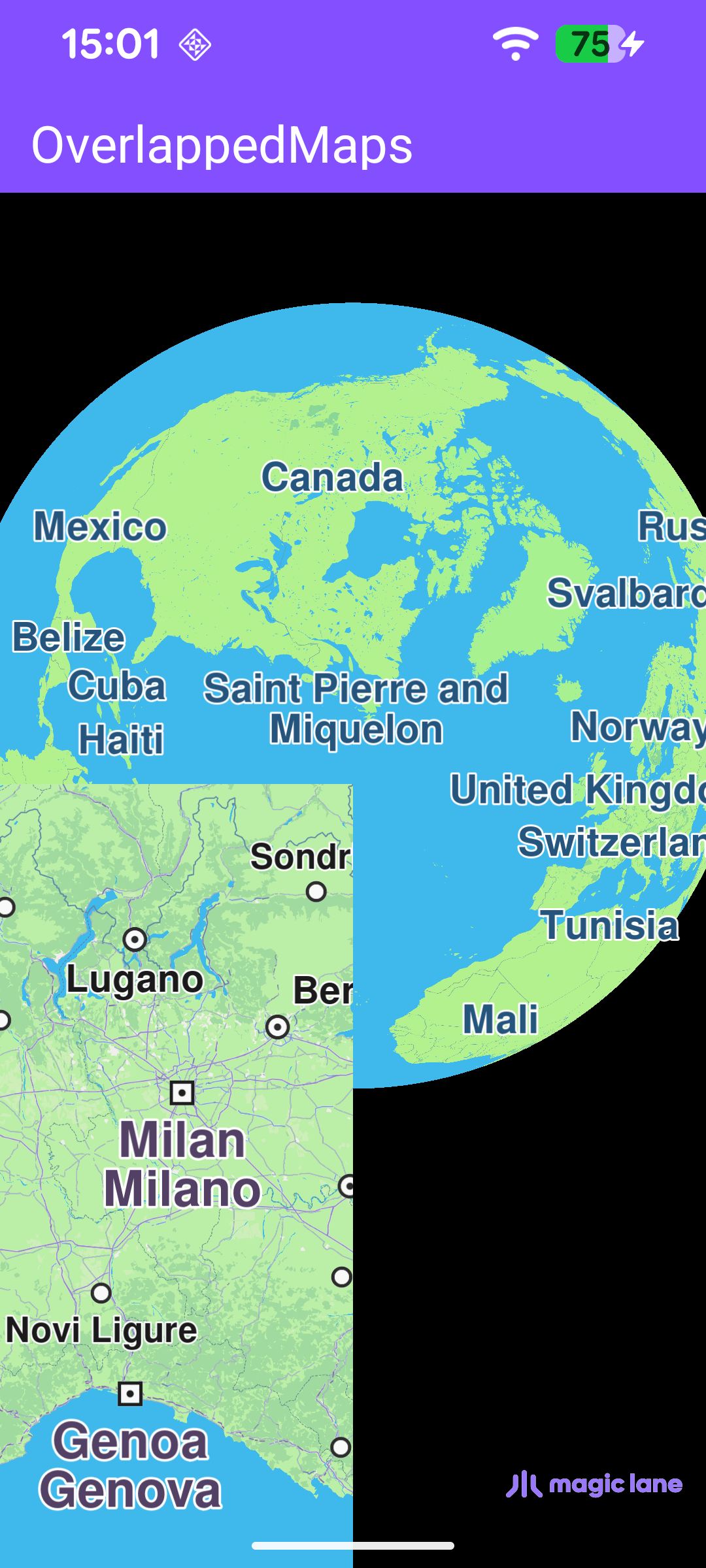
Two overlapped Map Views

Map Display and Cleanup

MainActivity overrides onCreate, which inflates the view binding, calls setContentView(binding.root) for the layout in res/layout/activity_main.xml, and enables edge-to-edge drawing so the map fills the screen. It then registers the SDK listeners.

When the activity is destroyed, onDestroy clears the listeners, deinitializes the SDK with GemSdk.release(), and exits the process so all native resources are freed.

MainActivity.ktView on Github
override fun onCreate(savedInstanceState: Bundle?) {
enableEdgeToEdge()
super.onCreate(savedInstanceState)
binding = ActivityMainBinding.inflate(layoutInflater)
setContentView(binding.root)

// Keep status-bar icons light against the dark primary toolbar background.
WindowCompat.getInsetsController(window, window.decorView).isAppearanceLightStatusBars = false

registerSdkListeners()
}

override fun onDestroy() {
super.onDestroy()
clearSdkListeners()
// Deinitialize the SDK.
GemSdk.release()
exitProcess(0)
}

The layout hosts a single com.magiclane.sdk.core.GemSurfaceView that fills the screen and renders the default map, with a toolbar pinned to the top.

activity_main.xmlView on Github
<com.magiclane.sdk.core.GemSurfaceView
android:id="@+id/gem_surface_view"
android:layout_width="match_parent"
android:layout_height="match_parent" />

Creating the Overlapped Map

The second map is created inside onDefaultMapViewCreated, which fires once the full-screen (default) map is ready and can be safely accessed. At that point the example:

  1. Pins the Magic Lane watermark logo to the bottom-right corner of the full-screen map, where it stays clear of the overlapped view.
  2. Produces the second map view on the same screen with MapView.produce.
  3. Calls updateFocusViewport() to keep the logo clear of the system bars.

MapView.produce(screen, screenRatio, camera, postLambdasOnMain) creates a new map view on the given screen. The screenRatio is a normalized RectF expressed as a fraction of the parent screen - here SECOND_VIEW_RECT = RectF(0.0f, 0.0f, 0.5f, 0.5f), which places the second view in the bottom-left quarter of the screen. Passing null for the camera lets the SDK create and assign a dedicated one, which is what makes the second map independently navigable.

MainActivity.ktView on Github
// Registers all SDK surface and settings callbacks.
private fun registerSdkListeners() {
binding.gemSurfaceView.onSdkInitFailed = { error ->
// The SDK is not initialized yet, so resolve the message directly (no SdkCall).
val errorMessage = getString(R.string.sdk_initialization_failed, GemError.getMessage(error, this))
runOnAliveUi { showDialog(errorMessage) { finish() } }
}

binding.gemSurfaceView.onDefaultMapViewCreated = { mapView ->
// Pin the Magic Lane watermark logo to the bottom-right corner of the full-screen
// (first) map view, where it stays clear of the overlapped second view.
mapView.setWatermarkLogoProperties(EWatermarkPosition.EWPBottomRight, LOGO_SIZE_MM, LOGO_ALPHA)

// Once the default (full-screen) map exists, overlap a second map view on top of it.
binding.gemSurfaceView.gemScreen?.let { screen ->
secondMapView = MapView.produce(screen, SECOND_VIEW_RECT, null, true)
}

// Keep the watermark logo clear of the system window insets.
updateFocusViewport()
}

// Re-align the logo whenever the surface is resized (e.g. rotation).
binding.gemSurfaceView.onSurfaceChanged = { _, _ ->
updateFocusViewport()
}

SdkSettings.onApiTokenRejected = {
runOnAliveUi { showDialog(getString(R.string.token_rejected_message)) }
}
}

The remaining callbacks handle the map's lifecycle: onSdkInitFailed shows an error dialog and closes the activity if the SDK cannot initialize, onSurfaceChanged re-aligns the logo on resize (e.g. rotation), and SdkSettings.onApiTokenRejected warns the user when the API token is invalid. The UI work is marshalled onto the main thread by runOnAliveUi, which only runs while the activity is still alive.

Keeping the Logo Clear of the System Bars

Because the full-screen map draws edge-to-edge, it extends underneath the status and navigation bars. updateFocusViewport() sets the map view's focusViewport to the region left after subtracting the system window insets, so the bottom-right watermark logo stays visible. Map access must run on the SDK thread, so the work is wrapped in SdkCall.runSynced.

MainActivity.ktView on Github
private fun updateFocusViewport() {
SdkCall.runSynced {
val mapView = binding.gemSurfaceView.mapView ?: return@runSynced
val viewport = mapView.viewport ?: return@runSynced
val insets = ViewCompat.getRootWindowInsets(binding.root)?.getInsets(SYSTEM_INSET_TYPES)

val left = insets?.left ?: 0
val top = insets?.top ?: 0
val right = (viewport.width - (insets?.right ?: 0)).coerceAtLeast(left)
val bottom = (viewport.height - (insets?.bottom ?: 0)).coerceAtLeast(top)
mapView.preferences?.focusViewport = Rect(left, top, right, bottom)
}
}

Releasing the Listeners

clearSdkListeners() is called from onDestroy to detach every callback and drop the reference to the second map view before the activity goes away. Resetting the listeners to empty lambdas guarantees that a late SDK callback can never touch a destroyed activity.

MainActivity.ktView on Github
// Clears SDK-level listeners to avoid callbacks reaching a destroyed activity.
private fun clearSdkListeners() {
SdkSettings.onWorldwideRoadMapSupportStatus = {}
SdkSettings.onApiTokenRejected = {}
binding.gemSurfaceView.apply {
onSdkInitFailed = {}
onDefaultMapViewCreated = {}
onSurfaceChanged = { _, _ -> }
}
secondMapView = null
}