
Map Compass

Last updated: June 16, 2026 | 6 minutes read

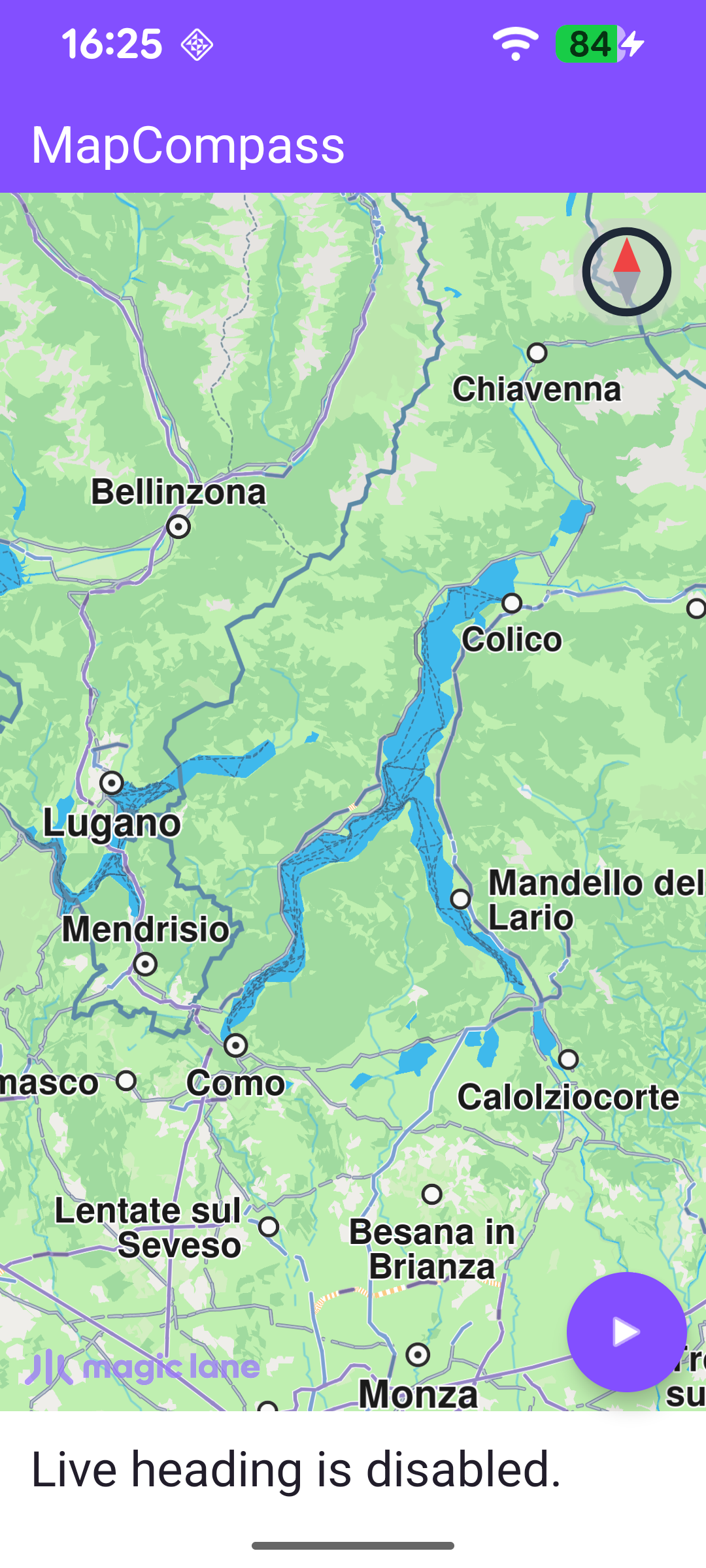
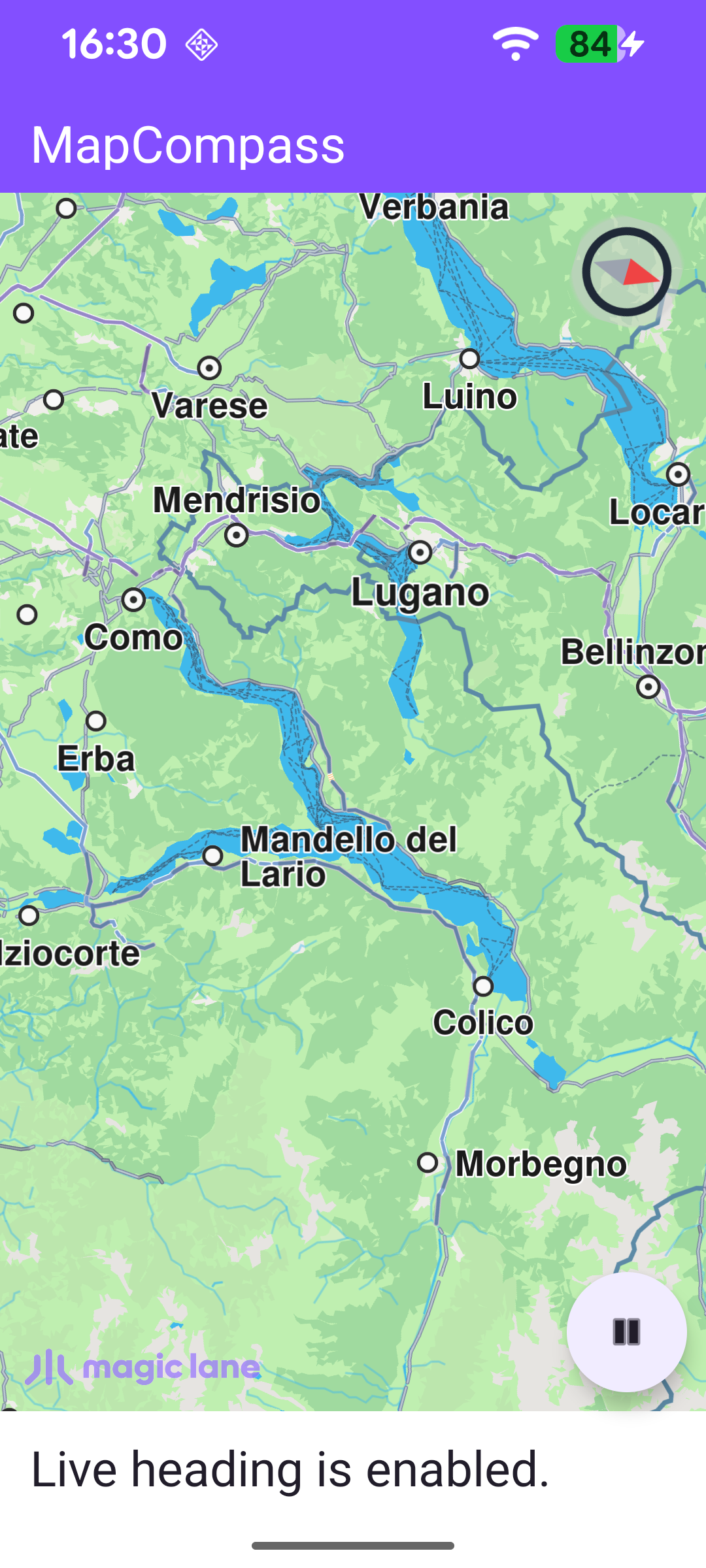
This example demonstrates how to render a compass icon that reflects the map's heading, where 0° is north, 90° is east, 180° is south and 270° is west. Tapping the compass animates the map back to a north-up orientation. The example also shows how to enable live heading: reading the device's compass sensor so the map rotates as you physically turn the device.

Initial map rotation angle, north pointing up
Map rotation angle changed, north pointing differently

Map Display and Lifecycle

MainActivity overrides onCreate, which inflates the view binding, calls setContentView(binding.root) for the layout in res/layout/activity_main.xml, and enables edge-to-edge drawing. It then wires up the UI in setupUi() and registers the SDK listeners.

onStop stops live heading so the sensor isn't read while the app is in the background, and onDestroy clears the listeners, releases the SDK with GemSdk.release(), and exits the process.

MainActivity.ktView on Github
override fun onCreate(savedInstanceState: Bundle?) {
enableEdgeToEdge()
super.onCreate(savedInstanceState)
binding = ActivityMainBinding.inflate(layoutInflater)
setContentView(binding.root)

// Keep status-bar icons light against the dark primary toolbar background.
WindowCompat.getInsetsController(window, window.decorView).isAppearanceLightStatusBars = false

setupUi()
registerSdkListeners()
}

override fun onStop() {
super.onStop()
stopLiveHeading()
}

override fun onDestroy() {
clearSdkListeners()

// Deinitialize the SDK.
GemSdk.release()

super.onDestroy()
exitProcess(0)
}

The layout stacks the controls over a full-screen GemSurfaceView: a compass image in the top-right corner, a FloatingActionButton to toggle live heading, and a status_text strip along the bottom. All three start hidden (visibility="gone") and are revealed once the map is ready.

activity_main.xmlView on Github
<com.magiclane.sdk.core.GemSurfaceView
android:id="@+id/surface_view"
android:layout_width="match_parent"
android:layout_height="match_parent" />

<com.google.android.material.imageview.ShapeableImageView
android:id="@+id/compass"
android:layout_width="@dimen/compass_height"
android:layout_height="@dimen/compass_height"
android:visibility="gone"
android:src="@drawable/ic_north_up_foreground"
app:layout_constraintEnd_toEndOf="parent"
app:layout_constraintTop_toBottomOf="@id/toolbar" />

<com.google.android.material.floatingactionbutton.FloatingActionButton
android:id="@+id/btn_enable_live_heading"
style="@style/Widget.MapCompass.LiveHeadingFab"
android:visibility="gone"
app:layout_constraintBottom_toTopOf="@id/status_text"
app:layout_constraintEnd_toEndOf="parent" />

Wiring the Compass to the Map

The compass behavior is set up in registerSdkListeners(). Once the map is ready (onDefaultMapViewCreated), the controls are shown and two links are established:

  • mapView.onMapAngleUpdated fires on every map rotation and rotates the compass icon to match. The angle is negated (-it) so the needle points to true north as the map turns underneath it.
  • Tapping the compass calls mapView.alignNorthUp(Animation(EAnimation.Linear, 300)) to animate the map back to north-up over 300 ms - but only while live heading is off, since otherwise the sensor would immediately rotate it again.

The remaining callbacks handle the lifecycle: onSdkInitFailed reports a fatal init error and closes the activity, onSurfaceChanged re-aligns the logo on resize, and SdkSettings.onApiTokenRejected warns about an invalid token.

MainActivity.ktView on Github
private fun registerSdkListeners() {
binding.surfaceView.onSdkInitFailed = { error ->
val errorMessage = getString(R.string.sdk_initialization_failed, GemError.getMessage(error, this))
runOnAliveUi {
showErrorDialog(errorMessage) { finish() }
}
}

binding.surfaceView.onDefaultMapViewCreated = { mapView ->
// Align the Magic Lane logo with the system window insets on first map creation.
updateFocusViewport()

runOnAliveUi {
showMapControls()

// Change the compass icon rotation based on the map rotation at rendering.
mapView.onMapAngleUpdated = {
binding.compass.rotation = -it.toFloat()
}

// Align the map to north if the compass icon is pressed.
binding.compass.setOnClickListener {
SdkCall.execute {
if (!isLiveHeadingEnabled.get()) {
mapView.alignNorthUp(Animation(EAnimation.Linear, 300))
}
}
}
}
}

// Re-align the logo whenever the surface is resized (e.g. on rotation).
binding.surfaceView.onSurfaceChanged = { _, _ ->
updateFocusViewport()
}

SdkSettings.onApiTokenRejected = {
runOnAliveUi {
showErrorDialog(getString(R.string.token_rejected_message))
}
}
}

Reading Live Heading from the Sensor

The floating button toggles live heading. toggleLiveHeading() flips the state, updates the button's appearance and status text via renderLiveHeadingState() (a play icon when stopped, a pause icon when running), and starts or stops listening for sensor data.

MainActivity.ktView on Github
private fun toggleLiveHeading() {
val shouldEnable = !isLiveHeadingEnabled.get()
isLiveHeadingEnabled.set(shouldEnable)
renderLiveHeadingState(shouldEnable)

if (shouldEnable) {
startLiveHeading()
} else {
stopLiveHeading()
}
}

startLiveHeading() creates a live data source from the device's sensors with DataSourceFactory.produceLive() and registers dataSourceListener for EDataType.Compass data. Both the "no sensor available" and "listener rejected" cases surface an error dialog. stopLiveHeading() removes the listener and releases the data source.

MainActivity.ktView on Github
private fun startLiveHeading() = SdkCall.execute {
if (dataSource != null) return@execute

// Create a live data source backed by the device's real sensors.
val source = DataSourceFactory.produceLive()
if (source == null) {
runOnAliveUi { showErrorDialog(getString(R.string.live_heading_unavailable)) }
return@execute
}
dataSource = source

// Start listening for compass data and surface any failure to the user.
val errorCode = source.addListener(dataSourceListener, EDataType.Compass, critical = false)
if (errorCode != GemError.NoError) {
runOnAliveUi {
// Resolve the error message on the SDK thread, off the live-heading execute block.
val message = SdkCall.runSynced { GemError.getMessage(errorCode, this) }
showErrorDialog(getString(R.string.live_heading_failed, message))
}
}
}

private fun stopLiveHeading() = SdkCall.execute {
dataSource?.let {
it.removeListener(dataSourceListener)
it.release()
dataSource = null
}
}

Each time the compass sensor delivers a new reading, dataSourceListener.onNewData runs on the SDK thread via SdkCall.postAsync. The raw heading is passed through HeadingSmoother, which keeps a rolling window of recent readings and returns their circular average (it sums the sine and cosine components and takes atan2), removing the jitter typical of raw magnetometer data. The smoothed value is applied to the map as preferences.rotationAngle, so the map turns with the device.

MainActivity.ktView on Github
private val dataSourceListener = object : DataSourceListener() {
override fun onNewData(data: SenseData) {
SdkCall.postAsync {
// smooth new compass data
val heading = headingSmoother.update(CompassData(data).heading)

// update map view based on the recent changes
binding.surfaceView.mapView?.preferences?.rotationAngle = heading
}
}
}

Keeping the Logo Clear of the System Bars

Because the map draws edge-to-edge, updateFocusViewport() keeps the Magic Lane logo visible by setting the map view's focusViewport to the area free of the system window insets. Here it also accounts for the bottom status_text strip, reserving whichever reaches higher - the navigation bar or the status text. Map access runs on the SDK thread inside SdkCall.runSynced.

MainActivity.ktView on Github
private fun updateFocusViewport() {
SdkCall.runSynced {
val mapView = binding.surfaceView.mapView ?: return@runSynced
val viewport = mapView.viewport ?: return@runSynced
val insets = ViewCompat.getRootWindowInsets(binding.root)?.getInsets(SYSTEM_INSET_TYPES)

// The status text covers a strip at the bottom of the screen while visible.
val statusTextHeight = if (binding.statusText.isVisible) binding.statusText.height else 0

val left = insets?.left ?: 0
val top = insets?.top ?: 0
val right = (viewport.width - (insets?.right ?: 0)).coerceAtLeast(left)
// Keep the logo clear of whichever reaches higher: the system bar or the status text.
val bottomOccupied = maxOf(insets?.bottom ?: 0, statusTextHeight)
val bottom = (viewport.height - bottomOccupied).coerceAtLeast(top)
mapView.preferences?.focusViewport = Rect(left, top, right, bottom)
}
}

Releasing the Listeners

clearSdkListeners() is called from onDestroy to detach every SDK callback before the activity goes away, so a late callback can never reach a destroyed activity.
MainActivity.ktView on Github
private fun clearSdkListeners() {
SdkSettings.onApiTokenRejected = {}
binding.surfaceView.apply {
onSdkInitFailed = {}
onDefaultMapViewCreated = {}
onSurfaceChanged = { _, _ -> }
}
}