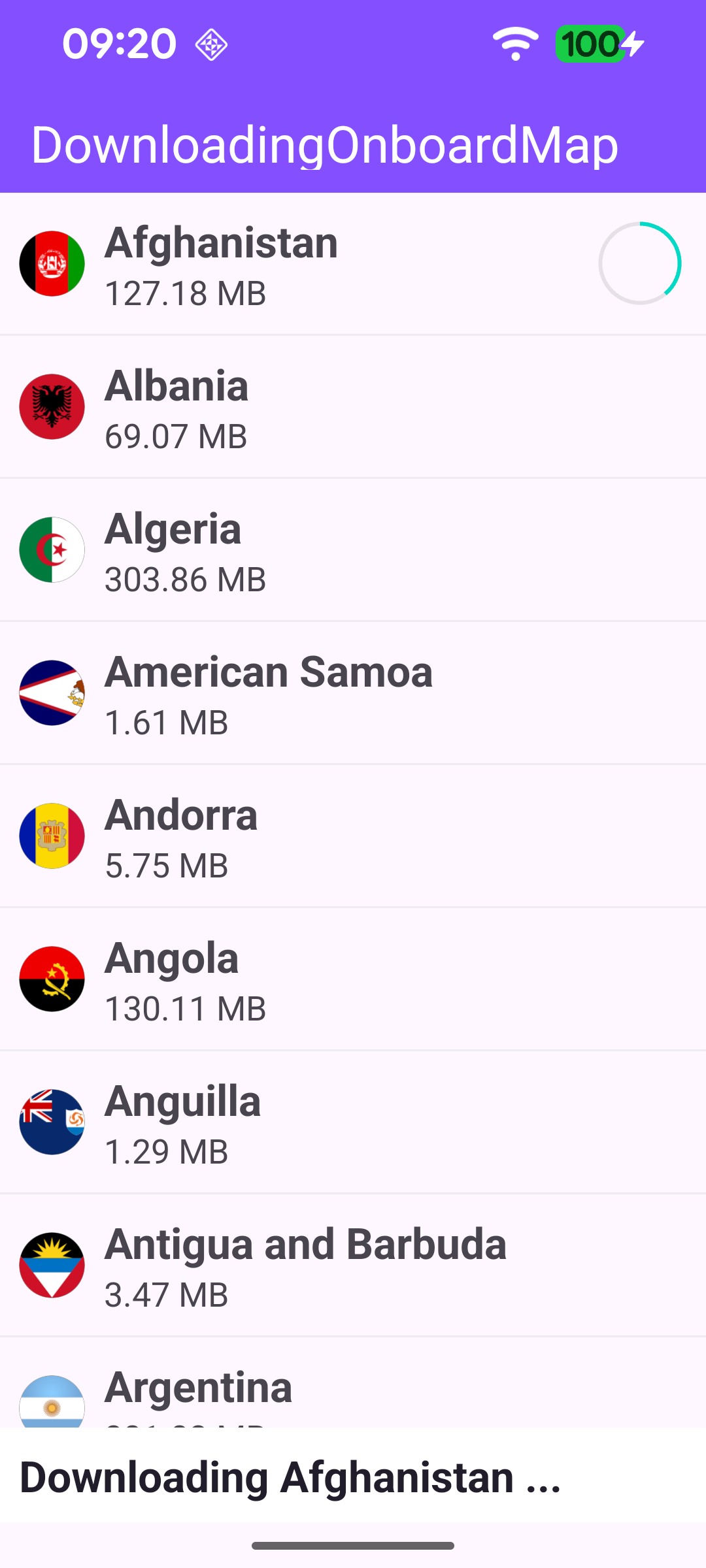
This example demonstrates how to use the content store to retrieve the catalog of road maps available on the server, download the first map in that catalog, and display its download progress.
MainActivity overrides onCreate, which inflates the layout with data binding, sets up the RecyclerView that lists the maps, and registers the SDK listeners. It then calls GemSdk.initSdkWithDefaults(this).
The SDK must be initialized before any of its functionality - such as the content store - can be used. In the examples that display a map, this happens automatically: the GemSurfaceView placed in the activity's layout initializes the SDK as part of setting up the map. This example does not display a map, so there is no GemSurfaceView to initialize the SDK for it; the initialization must therefore be performed explicitly with GemSdk.initSdkWithDefaults(this).
Finally, onCreate checks for an internet connection, since the catalog can only be fetched online.
Before requesting the catalog, the example confirms the app's token is valid. registerSdkListeners() waits for onWorldwideRoadMapSupportStatus to report UpToDate, then verifies the app authorization with SdkSettings.verifyAppAuthorization. It unsubscribes after the first event so verification only runs once. A rejected token (onApiTokenRejected) shows an error and closes the app.
loadMapsCatalog() asks the content store for the list of road maps with contentStore.asyncGetStoreContentList(EContentType.RoadMap, progressListener). The call runs on the SDK thread via SdkCall.execute, and the progressListener is notified as the catalog download starts, progresses and completes.
When the catalog finishes downloading, progressListener.onCompleted reads the local copy of the list into mapsCatalog with contentStore.getStoreContentList(EContentType.RoadMap)?.first. For this example it automatically picks the first map and starts downloading it with ContentStoreItem.asyncDownload(listener, savePolicy, allowChargedNetworks); in a real app the user would choose which map to download.
The error code returned by asyncDownload is handled in three cases:
GemError.NoError - the download started successfully, and the downloadProgressListener (below) reports its progress.
GemError.UpToDate - the map has already been downloaded in a previous app session, so it is already available on the device and there is nothing to download; the user is simply informed of this.
any other code - a real error occurred (for example a network problem), and its message is shown to the user.
displayList(mapsCatalog) then renders the full catalog.
The downloaded map is stored on the device under a path such as /sdcard/Android/data/<app-id>/files/Data/Maps/.
The downloadProgressListener created above updates the UI as the map downloads. onProgress and onCompleted call notifyItemChanged(0) so the first list row re-binds and reflects the latest progress and status, while the status text reports the outcome.
displayList() assigns a CustomAdapter to the RecyclerView. For each ContentStoreItem, onBindViewHolder shows the map's name, its size formatted with GemUtil.formatSizeAsText(totalSize), and a country flag. The item's status drives the row's trailing widget: a status icon when the map is Completed, or a progress bar bound to downloadProgress while DownloadRunning. All ContentStoreItem access happens inside SdkCall.execute, since these are SDK objects.
The country flag is fetched with MapDetails().getCountryFlag(isoCode) from the item's countryCodes and rendered to a Bitmap. Flags are cached by ISO code so each one is rendered only once.