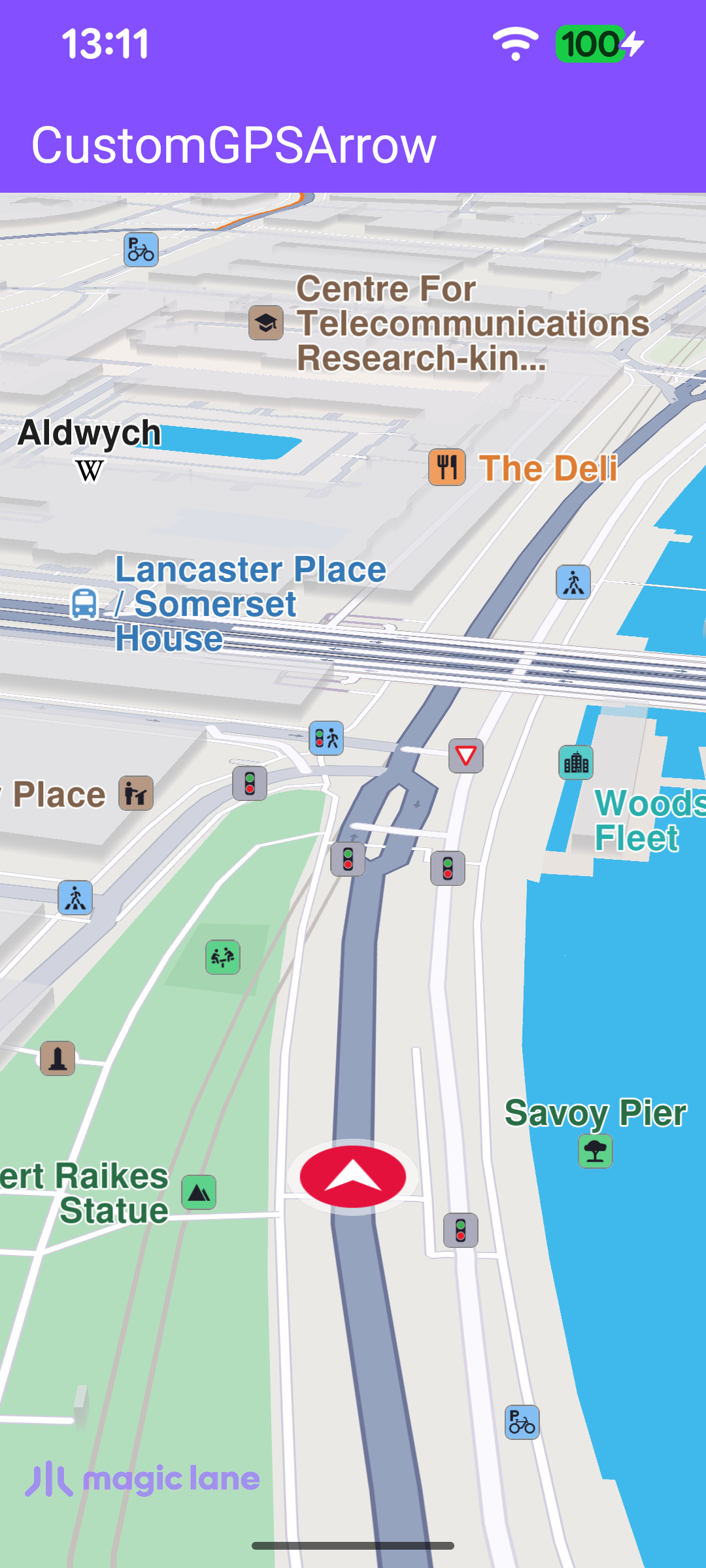
This example demonstrates how to replace the default position tracker with a custom GPS arrow. A 3D model is bundled in the project's assets folder, loaded as a scene object, and applied to the map's default position tracker. When the destination is reached (or navigation ends with an error), the follow-position button is disabled and any terminal error is surfaced to the user.
The simulation is used here only to produce GPS fixes for rendering the custom GPS arrow. The simulation route and the navigation panels are not displayed, as they are out of scope for this example.
MainActivity overrides onCreate, which inflates the view binding with DataBindingUtil.setContentView, and enables edge-to-edge drawing so the map fills the screen. It then registers the SDK listeners and checks for an internet connection (needed to load the base map data).
When the activity is destroyed, onDestroy clears the listeners, deinitializes the SDK with GemSdk.release(), and exits the process. exitProcess is required because the SDK holds native threads that do not stop on their own when the activity is destroyed.
registerSdkListeners() wires up the map surface callbacks. When the default map view is created, the example aligns the Magic Lane logo and loads the custom arrow with loadCustomArrow(). When the worldwide road map is up to date, it clears that callback (so it never fires twice) and starts the simulation.
loadCustomArrow() is the core of the example. It reads the bundled quad.glb GLTF model from the assets folder, fetches the map's default position tracker with MapSceneObject.getDefPositionTracker(), and replaces its geometry with the loaded model through MapSceneObject.customizeDefPositionTracker(objList). The tracker's scaleFactor can be adjusted in the range 0.0 – 5.0 to size the arrow.
getSceneObjs() reads each asset file and wraps its bytes in a SceneObjectData, collecting them into a SceneObjectDataList. Each file is loaded independently so one failure does not abort the rest.
Once the road map is ready, startSimulation() builds a two-waypoint route from London to Paris and starts a simulated navigation with navigationService.startSimulation(). The navigationListener drives the GPS-button lifecycle: onNavigationStarted enables the follow-position button and calls followPosition() so the camera tracks the custom arrow, while onDestinationReached and onNavigationError both route to onNavigationEnded() to tear it down again.
enableGPSButton() keeps the camera locked to the moving arrow. The follow-cursor button is hidden while the map is following the position and shown again as soon as the user pans away; tapping it re-centers the camera with followPosition().
When the route is finished, the listener's onDestinationReached/onNavigationError callbacks invoke onNavigationEnded(). It surfaces any terminal error in a dialog (ignoring the benign NoError and Cancel codes) and then disables the GPS follow button.
val message = SdkCall.runSynced{ GemError.getMessage(errorCode,this)}?:""
if(message.isNotEmpty()){
showDialog(message)
}
}
disableGPSButton()
}
}
disableGPSButton() is the counterpart of enableGPSButton(): it detaches the follow-position callbacks, clears the button's click listener, and hides it so no stale interaction remains once navigation is over.