
Apply Map Style

Last updated: June 16, 2026 | 6 minutes read

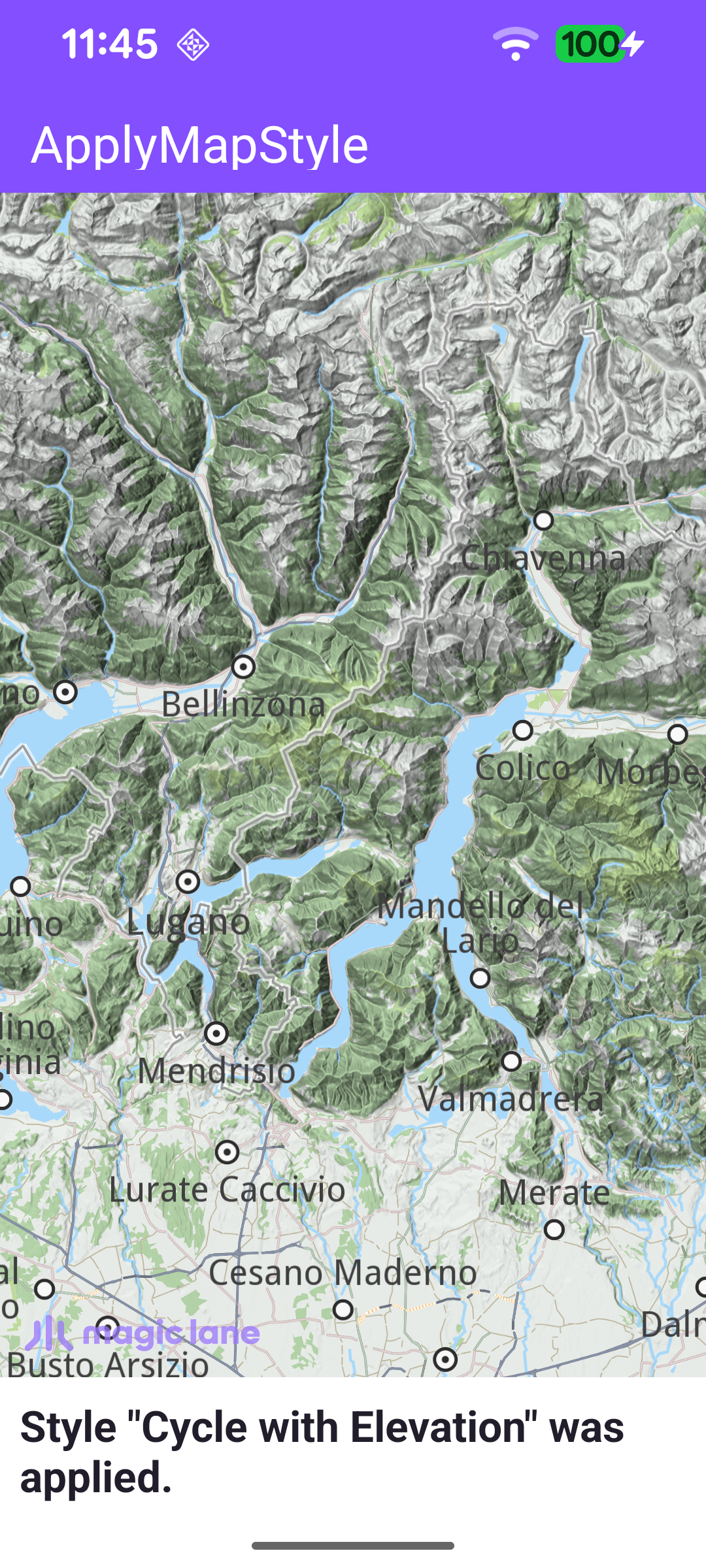
This example demonstrates how to change the appearance of an interactive map by downloading a map style from the content store and applying it to the map view.

Map style with topography

Map Display and Setup

MainActivity overrides onCreate, which inflates the view binding, calls setContentView(binding.root) for the layout in res/layout/activity_main.xml, and enables edge-to-edge drawing so the map fills the screen. It then registers the SDK listeners and checks for an internet connection, since the styles are fetched online.

When the activity is destroyed, onDestroy clears the listeners, deinitializes the SDK with GemSdk.release(), and exits the process.

MainActivity.ktView on Github
override fun onCreate(savedInstanceState: Bundle?) {
enableEdgeToEdge()
super.onCreate(savedInstanceState)

binding = ActivityMainBinding.inflate(layoutInflater)
setContentView(binding.root)

// Keep status-bar icons light against the dark primary toolbar background.
WindowCompat.getInsetsController(window, window.decorView).isAppearanceLightStatusBars = false

registerSdkListeners()

if (!Util.isInternetConnected(this)) {
showDialog(getString(R.string.internet_required))
}
}

override fun onDestroy() {
super.onDestroy()
clearSdkListeners()
GemSdk.release()
exitProcess(0)
}

The layout hosts a full-screen com.magiclane.sdk.core.GemSurfaceView that renders the map, plus a status_text panel and a progress indicator used to report what the app is doing.

activity_main.xmlView on Github
<com.magiclane.sdk.core.GemSurfaceView
android:id="@+id/gem_surface"
android:layout_width="match_parent"
android:layout_height="match_parent" />

Connecting and Verifying Authorization

Styles are downloaded from the content store, which requires a verified app token. registerSdkListeners() waits for SdkSettings.onConnectionStatusUpdated to report a connection, then verifies the app authorization with SdkSettings.verifyAppAuthorization. It self-clears after the first connection event so verification runs only once. The surface callbacks handle init failure and keep the Magic Lane logo aligned with the system insets.

MainActivity.ktView on Github
private fun registerSdkListeners() {
binding.gemSurface.onSdkInitFailed = { error ->
val errorMessage = getString(R.string.sdk_initialization_failed, GemError.getMessage(error, this))
runOnAliveUi { showDialog(errorMessage) { finish(); exitProcess(0) } }
}

// Adjust the Magic Lane logo position once the map view is ready.
binding.gemSurface.onDefaultMapViewCreated = {
updateFocusViewport()
}

// Re-adjust after rotation or other surface size changes.
binding.gemSurface.onSurfaceChanged = { _, _ ->
updateFocusViewport()
}

SdkSettings.onConnectionStatusUpdated = { isConnected ->
if (isConnected) {
showStatusMessage(getString(R.string.check_application_token), true)
SdkSettings.appAuthorization?.let {
SdkCall.execute {
SdkSettings.verifyAppAuthorization(it, listener)
}
} ?: run {
showInvalidTokenDialog()
}
// Self-clear: only the first connection event matters.
SdkSettings.onConnectionStatusUpdated = {}
}
}
}

When verification completes, the listener proceeds to fetch the styles, or shows an invalid-token dialog on failure.

MainActivity.ktView on Github
// Listener used to verify the app authorization token after connection is established.
private val listener = ProgressListener.create(onCompleted = { errorCode, _ ->
if (errorCode != GemError.NoError) {
showInvalidTokenDialog()
} else {
fetchAvailableStyles()
}
})

Fetching the Available Styles

fetchAvailableStyles() asks the content store for the list of map styles with contentStore.asyncGetStoreContentList(EContentType.ViewStyleHighRes, ...). When the list arrives, the example picks one style and downloads it; in a real app the user would choose. To showcase a clearly non-default look, it selects the style at the midpoint of the list (or the only one if the list has a single entry).

MainActivity.ktView on Github
private fun fetchAvailableStyles() = SdkCall.execute {
// Request the list of available map styles from the content store.
contentStore.asyncGetStoreContentList(
EContentType.ViewStyleHighRes,
onStarted = {
showStatusMessage(getString(R.string.download_map_styles_list), true)
},

onCompleted = onCompleted@{ styles, errorCode, _ ->
if (errorCode != GemError.NoError) {
showDialog(
getString(R.string.map_style_list_download_failed, SdkCall.runSynced { GemError.getMessage(errorCode, this) }),
) {
finish()
exitProcess(0)
}
} else {
if (styles.isEmpty()) {
showDialog(getString(R.string.map_style_list_empty)) {
finish()
exitProcess(0)
}
} else {
// Pick the style at the midpoint of the list to showcase a non-default style.
val style = if (styles.size > 1) {
styles[(styles.size / 2) - 1]
} else {
styles[0]
}

startDownloadingStyle(style)
}
}
},
)
}

Downloading and Applying a Style

startDownloadingStyle(style) first checks the item's status: if it is already EContentStoreItemStatus.Completed - downloaded in a previous session - it applies the style immediately. Otherwise it starts the download with ContentStoreItem.asyncDownload, and applies the style in the onCompleted callback once the data is local.

MainActivity.ktView on Github
private fun startDownloadingStyle(style: ContentStoreItem) = SdkCall.execute {
if (style.status == EContentStoreItemStatus.Completed) {
// Style already downloaded; apply it immediately.
applyStyle(style)
showStatusMessage(getString(R.string.style_applied, style.name))
return@execute
}

// Style not yet local - kick off the download.
val errorCode = style.asyncDownload(
onStarted = {
showStatusMessage(getString(R.string.download_map_style, style.name), true)
},

onCompleted = { error, _ ->
if (error != GemError.NoError) {
showDialog(getString(R.string.map_style_download_failed, SdkCall.runSynced { GemError.getMessage(error, this) })) {
finish()
exitProcess(0)
}
} else {
applyStyle(style)
showStatusMessage(getString(R.string.style_applied, style.name))
}
},
)

if (errorCode != GemError.NoError) {
runOnAliveUi {
showDialog(getString(R.string.error_starting_download, SdkCall.runSynced { GemError.getMessage(errorCode, this) })) {
finish()
exitProcess(0)
}
}
}
}

Applying the style is the core of this example: applyStyle() sets the downloaded style on the map view with preferences?.setMapStyleById(style.id). The map redraws immediately with the new appearance.

MainActivity.ktView on Github
private fun applyStyle(style: ContentStoreItem) = SdkCall.execute {
// Apply the selected style to the main map view.
binding.gemSurface.mapView?.preferences?.setMapStyleById(style.id)
}

Keeping the Logo Clear of the System Bars

Because the map draws edge-to-edge, updateFocusViewport() keeps the Magic Lane logo visible by setting the map view's focusViewport to the area free of the system insets - or above the status panel when it is showing. Map access runs on the SDK thread inside SdkCall.runSynced.

MainActivity.ktView on Github
private fun updateFocusViewport() {
SdkCall.runSynced {
val mapView = binding.gemSurface.mapView ?: return@runSynced
val viewport = mapView.viewport ?: return@runSynced
val insets = ViewCompat.getRootWindowInsets(binding.root)?.getInsets(SYSTEM_INSET_TYPES)

val w = viewport.width
val h = viewport.height
val left = insets?.left ?: 0
val top = insets?.top ?: 0
val right = (w - (insets?.right ?: 0)).coerceAtLeast(left)
// Use the status panel height when visible, system bar inset otherwise.
val bottom = if (binding.statusText.isVisible) {
val panelHeight = binding.statusText.height.takeIf { it > 0 } ?: binding.statusText.measuredHeight
(h - panelHeight).coerceAtLeast(top)
} else {
(h - (insets?.bottom ?: 0)).coerceAtLeast(top)
}
mapView.preferences?.focusViewport = Rect(left, top, right, bottom)
}
}

Releasing the Listeners

clearSdkListeners() is called from onDestroy to detach every SDK callback before the activity goes away, so a late callback can never reach a destroyed activity.
MainActivity.ktView on Github
private fun clearSdkListeners() {
SdkSettings.onConnectionStatusUpdated = {}
binding.gemSurface.apply {
onSdkInitFailed = {}
onDefaultMapViewCreated = {}
onSurfaceChanged = { _, _ -> }
}
}